Audit SERPs for parasite platforms outranking your own pages
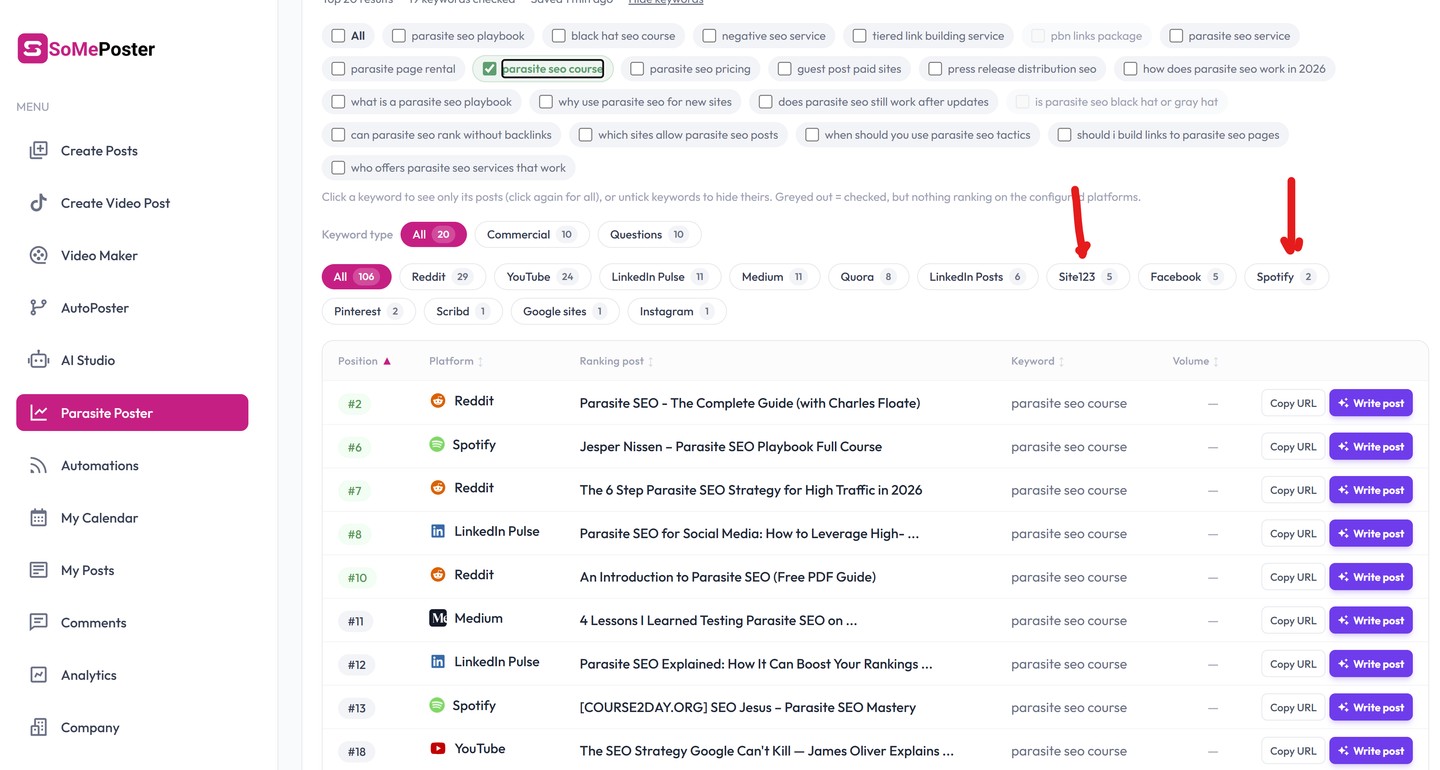
Third-party hosted pages such as Spotify episodes, Jimdo and Site123 sites can outrank a brand's own pages on its target keywords. Export your keyword set with top rankings, match result domains against a maintained list of strong parasite platforms, then decide per keyword whether to publish on that platform or strengthen your own URL.
Why this matters
Before you start
- A defined keyword list tied to commercial or brand pages
- Access to current top-10 ranking data (rank tracker export or Search Console performance export)
- A spreadsheet or script environment to run the domain matching
How to apply it
Export keywords with their top results
Pull your target keyword list with the current top-10 URLs and positions from your rank tracker, or export the Queries and Pages data from Search Console as a starting point. Keep one row per keyword-result pair so domains can be matched programmatically.
Check: Open the export and confirm it contains at least keyword, position and URL columns with no empty rows.
Build and store a parasite platform list
Create a maintained list of hosted platforms that let outsiders publish and rank. Start with the three named in the tweet (Spotify episodes, Jimdo, Site123) and add any other UGC or site-builder hosts you see recurring in your niche. Store it in a config file so it can be extended later.
Check: Every domain in the config file resolves to a real site and the list loads without parse errors.
Match result domains against the list
Run the export through a script that checks each result URL's registrable domain against the platform list. Output only the keywords where a matched platform ranks above your own URL, including its position and your position.
Check: Spot-check three flagged keywords manually in a browser and confirm the platform page really appears above your page.
Decide claim or defend per keyword
For each flagged keyword, record whether you will publish a presence on that platform or improve your own page. Prioritise keywords with commercial value; skip low-value informational queries.
Check: Every row in the output has a decision, an owner and a target date recorded.
Execute and re-check on a cadence
Ship the chosen action, then re-run the same audit monthly so newly ranking hosted pages are caught early. Log the run date and the count of flagged keywords each time to track whether the exposure is shrinking.
Check: A run log exists with the latest date and flagged-keyword count, and the next run is scheduled.
This happens outside your codebase
Work through the steps above on the named site or dashboard, then record the result in your agent session. There is no repository edit for this tip.
Source: @jespernissenseo on 2026-10-18 · original post · report an error