Find sites using Stripe Checkout via Similarweb referrals
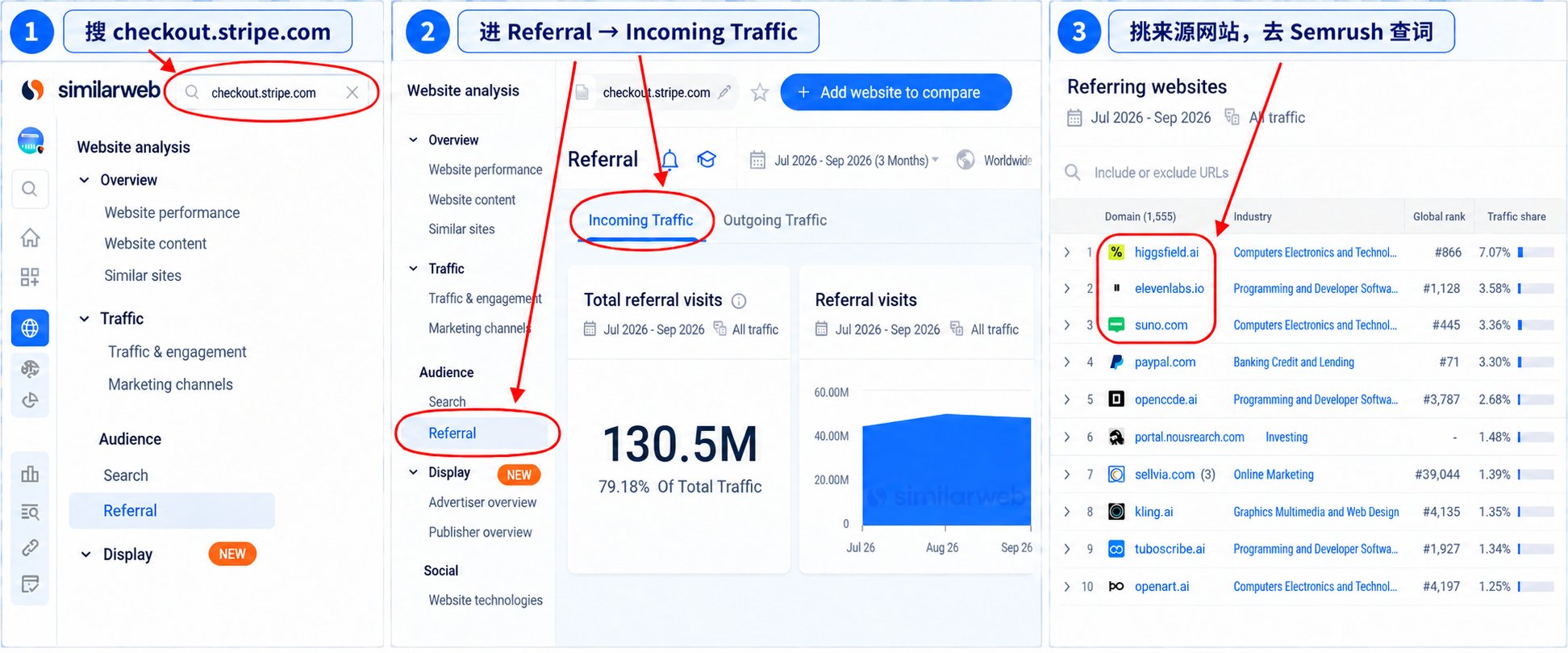
Open Similarweb, search checkout.stripe.com and open Referral -> Incoming Traffic. The referring websites are products that sell through Stripe Checkout. Take the interesting domains into Semrush -> Organic Rankings -> Positions to see which non-brand keywords bring them search traffic, then study what they sell, how they price and how they acquire demand.
Why this matters
Reverse-look the traffic going into a Stripe checkout to find overseas products worth studying.
Before you start
- A Similarweb account that can open the Referral report (the free tier shows limited rows)
- A Semrush account for the Organic Rankings -> Positions report
How to apply it
Search checkout.stripe.com in Similarweb
Open Similarweb and look up checkout.stripe.com. This is the shared checkout domain many products use, so its referral traffic is a list of sites pointing shoppers at Stripe cashiers.
Check: The Similarweb domain overview for checkout.stripe.com loads and shows a Referral section.
Open Referral and Incoming Traffic
Go to Referral -> Incoming Traffic and read the Referring websites list. Page through several pages: smaller vertical product sites show up deeper in the list and are often the more interesting leads.
Check: The Referring websites table lists at least ten domains, including small vertical sites, not only marketplaces.
Shortlist the product sites worth studying
Pick the referring websites that look like real products rather than payment platforms or test domains. Record each domain and what it appears to sell before opening another tool.
Check: The shortlist has one row per candidate with the domain and a one-line description of the product.
Read their organic keywords in Semrush
For each shortlisted domain, open Semrush -> Organic Rankings -> Positions and sort by traffic. Look for the non-brand keywords that bring search demand; a domain with no organic traffic is a weak lead even if it sells well.
Check: Every shortlisted domain has a Semrush Positions screenshot or exported row set showing its top non-brand keywords.
Combine offer, pricing and acquisition
Put what the product sells, its pricing and its acquisition keywords side by side. A pattern across several leads - a niche, a price point, a keyword family - is a stronger opportunity than a raw list of websites.
Check: The notes compare at least three leads on product, price and top keyword family.
Treat referrals as leads, not revenue
Referral traffic does not equal sales. Do not estimate revenue from this data; use it only to shortlist leads and to support a judgment about a niche.
Check: The final notes contain no revenue estimate derived from referral traffic, only lead qualification.
This happens outside your codebase
Work through the steps above on the named site or dashboard, then record the result in your agent session. There is no repository edit for this tip.
Source: @airobertdaily on 2026-10-18 · original post · report an error