Mine Similarweb subdomain reports for new keyword ideas
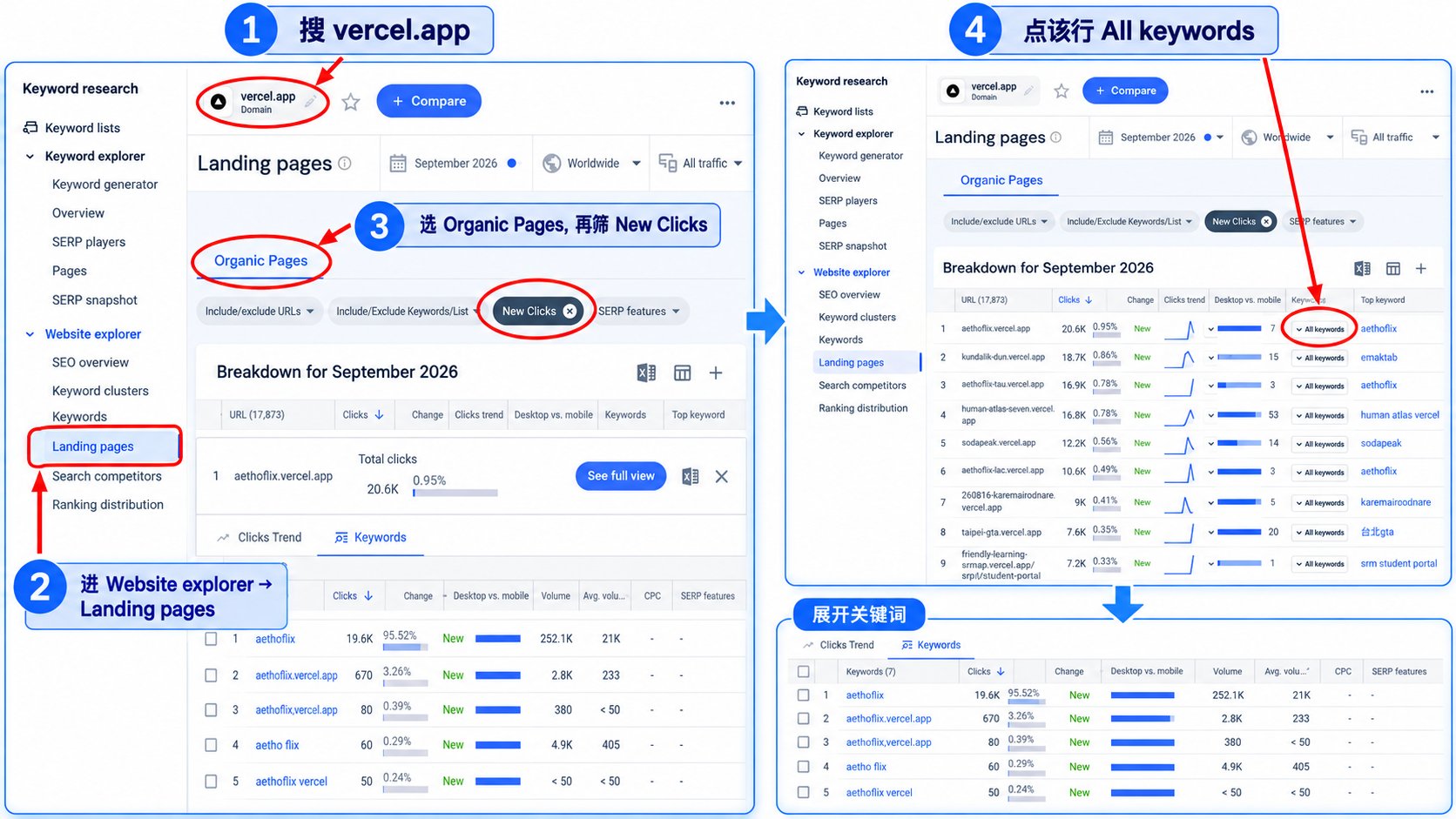
Open Similarweb, search vercel.app, and open the Organic landing pages report. Set the range to the last 1 to 12 months and tick "newly discovered" to list subdomains that recently started ranking; each one is a live niche test. Validate the queries it ranks for in Google Trends before building your own page.
Why this matters
Mine subdomains that recently gained organic traffic on shared hosting domains for untested niches.
Before you start
- A Similarweb account (free tier gives limited data)
How to apply it
Search vercel.app in Similarweb
Open Similarweb and search for vercel.app in the domain field, then load the website overview page.
Check: The Similarweb website page for vercel.app loads with a traffic chart and the report sidebar.
Open the Organic landing pages report
Inside the vercel.app website view, open the Organic landing pages report so the subdomains receiving organic traffic are listed.
Check: The Organic landing pages table lists *.vercel.app hostnames with a traffic column.
Set the last 1 to 12 months and tick newly discovered
Choose a date range covering the last 1 to 12 months, then tick the "newly discovered" filter so only pages that started ranking in that window remain.
Check: The report shows the newly-discovered filter active and the selected date range echoed in the toolbar.
Extract the newly discovered landing pages
Export or copy the filtered rows. For each subdomain, note the product or topic it appears to target before moving on.
Check: The exported list contains only hostnames that appear after the date-range and newly-discovered filters are applied.
Validate the keywords in Google Trends
Open Google Trends for the terms the subdomain appears to rank for, check interest over time and the regional breakdown, and keep only terms with real demand in your market.
Check: Google Trends shows a non-zero interest line for the term and Google returns relevant competing results for it.
This happens outside your codebase
Work through the steps above on the named site or dashboard, then record the result in your agent session. There is no repository edit for this tip.
Source: @airobertdaily on 2026-10-18 · original post · report an error