Publish a Zapier integration page for a high-authority listing
Build and publish an integration listing on Zapier so your SaaS has a page on a high-authority domain targeting branded and use-case queries. Confirm the product has a working MCP server or API first, create the app on Zapier, submit it, then check that the public listing page is indexed.
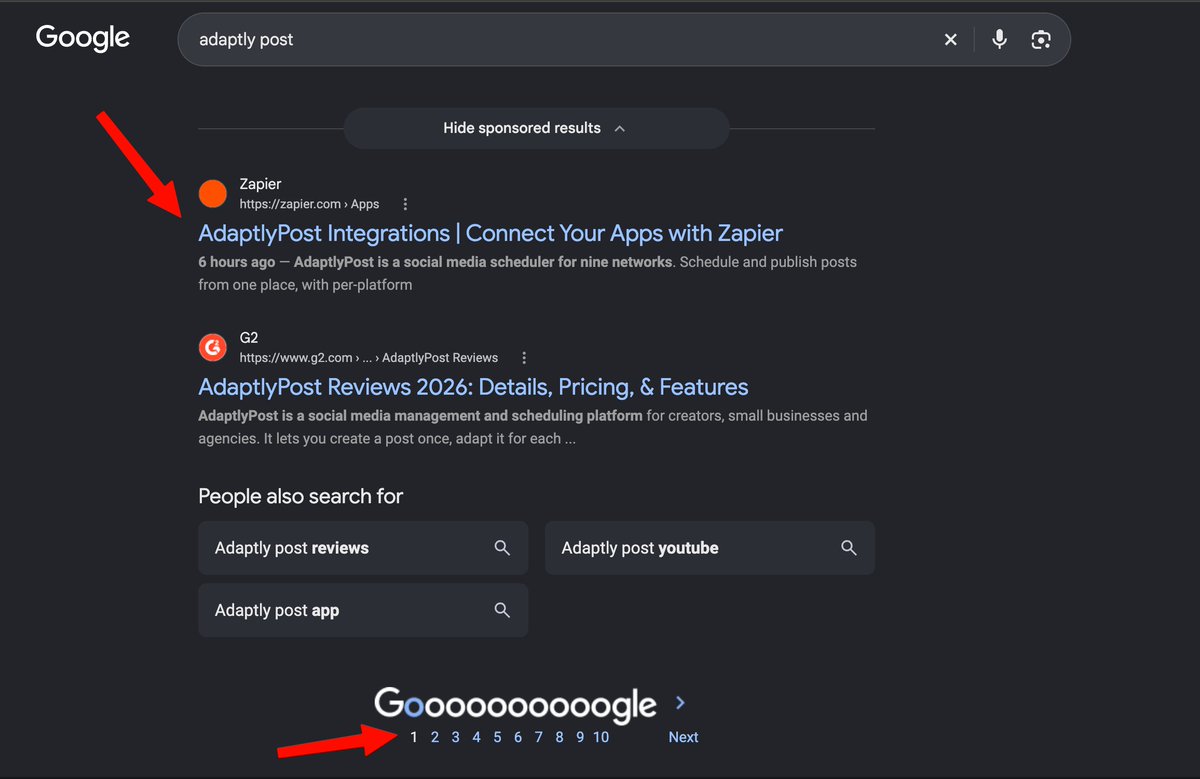
Why this matters
A public integration page on Zapier puts your SaaS on a high-authority domain that can rank on its own.
Before you start
- A SaaS product with a working MCP server or API Zapier can connect to
- A Zapier account (the source states a free trial is sufficient)
How to apply it
Confirm the integration surface works
Make sure the product exposes a working MCP server, as the source requires, or an API that Zapier can authenticate against. Test one authenticated request before starting the listing.
Check: An authenticated test request to the MCP server or API returns a successful response with valid credentials.
Create a Zapier account
Sign up for Zapier; according to the source, a free trial is enough to create an integration.
Check: You can sign in and reach the app creation area of the Zapier developer platform.
Create the integration
Create a new app in Zapier, fill in authentication, and define at least one trigger or action that reflects a real use case for the product.
Check: Zapier shows the app in your developer dashboard with its authentication and at least one trigger or action configured.
Write the public listing copy and submit for review General best practice
Add a description that names the product category and the specific tasks the integration automates, then submit the app so a public listing page is generated.
Check: A public URL on zapier.com for the app exists and loads without being logged in.
Confirm the listing page is indexed General best practice
Run a site: search on zapier.com for the app name to see whether Google has indexed the listing, and re-check after a few days if it has not appeared.
Check: A site:zapier.com query containing the app name returns the integration page URL in the results.
This happens outside your codebase
Work through the steps above on the named site or dashboard, then record the result in your agent session. There is no repository edit for this tip.
Source: @tarasshyn on 2026-10-18 · original post · report an error